
Use this page when a reader needs the full agent-by-agent setup for gloria.dev’s MCP server. The Quickstart condenses this flow into one step; this page keeps the per-agent reference in one place. For the condensed path, see Quickstart.
Prerequisites
Before you connect gloria.dev to a coding agent, make sure:
- The agent supports MCP. Claude Code, OpenAI Codex, OpenCode, and Cursor all do.
- You have a gloria.dev account and belong to an organization.
- An organization admin has already created the Doc Holiday API key. If not, follow the API key step in Quickstart before continuing.
Add the server
gloria.dev exposes a remote MCP server at https://mcp.gloria.dev/mcp. No local server process is required for normal use.
Claude Code
Use the marketplace plugin in Claude Code:
/plugin marketplace add sandgardenhq/gloria
/plugin install gloria@gloria
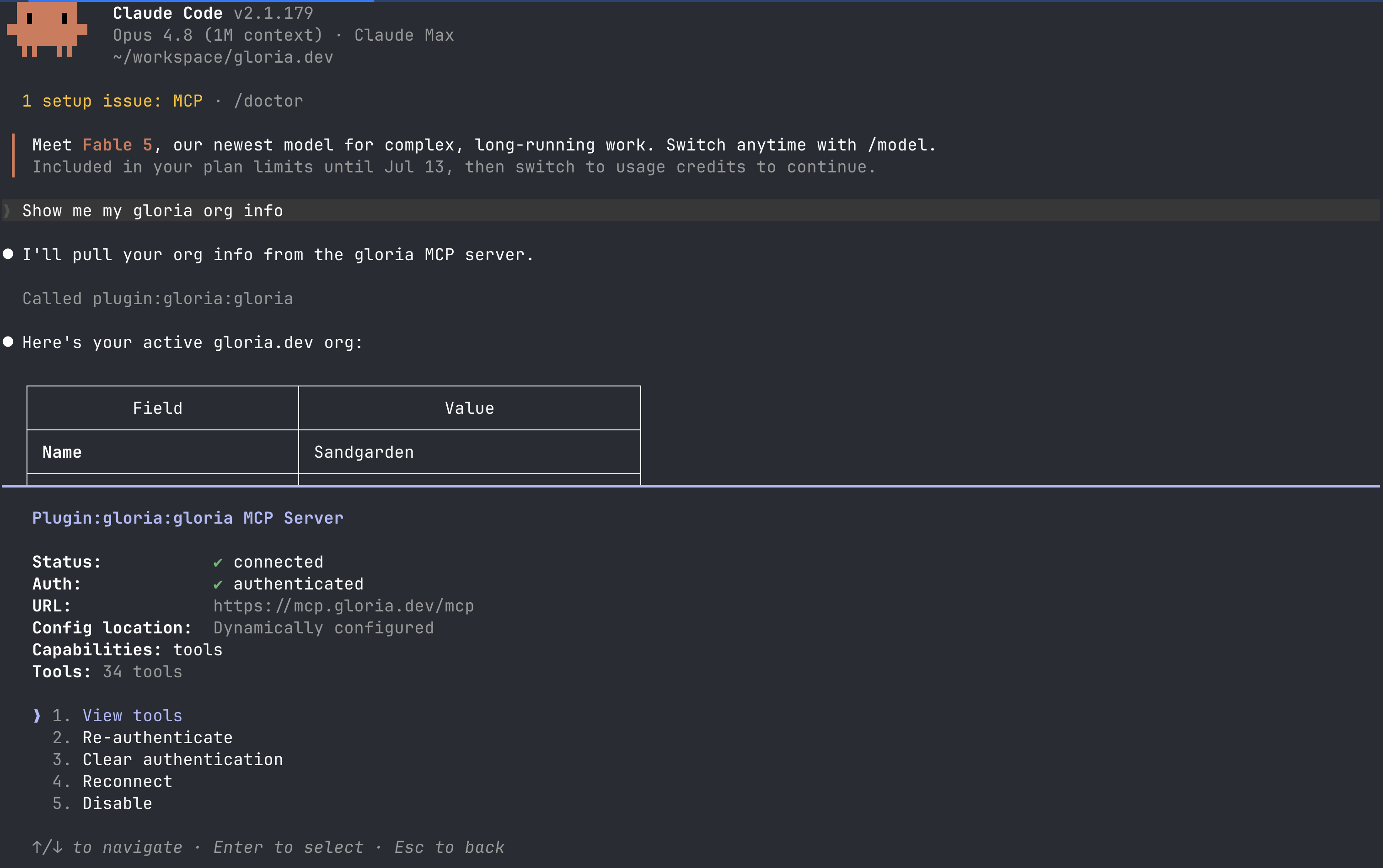
Then open /mcp, select gloria, and complete the one-time sign-in. The plugin adds the gloria.dev connection and installs Gloria’s bundled skills in the same setup flow.
Claude Code warns at session start when the installed Gloria plugin is older than the latest published version.
OpenAI Codex
Use the marketplace plugin in Codex:
codex plugin marketplace add sandgardenhq/gloria
/plugins                   # install gloria from inside Codex
codex mcp login gloria     # complete sign-in for the gloria.dev MCP server
/hooks                     # trust Gloria's update check so update nudges can run
codex plugin marketplace add sandgardenhq/gloriaregisters the Gloria marketplace./pluginsopens Codex’s plugin manager, where the Gloria plugin installs and adds the bundled skills plus the gloria.dev MCP connection.codex mcp login gloriacompletes the one-time OAuth sign-in to the hosted service. Gloria then uses the active organization automatically./hooksis a one-time trust step for Gloria’s update check. Codex does not warn about an older installed plugin version until Codex trusts that check.
OpenCode
OpenCode has no marketplace. Add gloria.dev as a plugin in your opencode.json file — global ~/.config/opencode/opencode.json or a project-local opencode.json both work:
{ "plugin": ["gloria@git+https://github.com/sandgardenhq/gloria.git"] }Then restart OpenCode. On first use, the plugin installs itself, registers gloria.dev’s skills, and connects to the MCP server at https://mcp.gloria.dev/mcp. OpenCode also warns when the installed Gloria plugin is older than the latest published version.
Cursor
Cursor has no plugin marketplace, so install the local Gloria plugin.
Run this command:
git -C ~/.cursor/plugins/sources/gloria pull || git clone https://github.com/sandgardenhq/gloria.git ~/.cursor/plugins/sources/gloria && mkdir -p ~/.cursor/plugins/local && ln -sf ~/.cursor/plugins/sources/gloria/plugins/gloria ~/.cursor/plugins/local/gloria~/.cursor/plugins/sources/gloriastores the cloned Gloria plugin source.mkdir -p ~/.cursor/plugins/localcreates Cursor’s local plugin directory if it does not exist yet.ln -sf ~/.cursor/plugins/sources/gloria/plugins/gloria ~/.cursor/plugins/local/gloriapoints Cursor at the Gloria plugin in the cloned repo.- The command is safe to run again whenever Cursor needs a refresh or repair because it updates an existing clone with
git -C ... pulland refreshes the symlink withln -sf.
Restart Cursor if it is already open, then authenticate when prompted the first time the plugin connects. Cursor reads the plugin from ~/.cursor/plugins/local/gloria, so it does not need a separate .cursor/mcp.json entry or a manual skills/ copy.
Verify the connection
Ask the agent to confirm the active organization first:
Show my Gloria organization details.A successful reply confirms that the connection is live and that the agent can reach gloria.dev from the installed plugin. After that, the available actions should include the project and dependency workflows.
For the condensed setup, go back to Quickstart. When the server is connected, continue with Register a Project.